
Schedule & bookings
Your class schedule, full and hassle-free
You plan the week in the editor, members book and cancel on their own, and when a spot opens up, the next member on the waitlist moves up automatically if you want that.
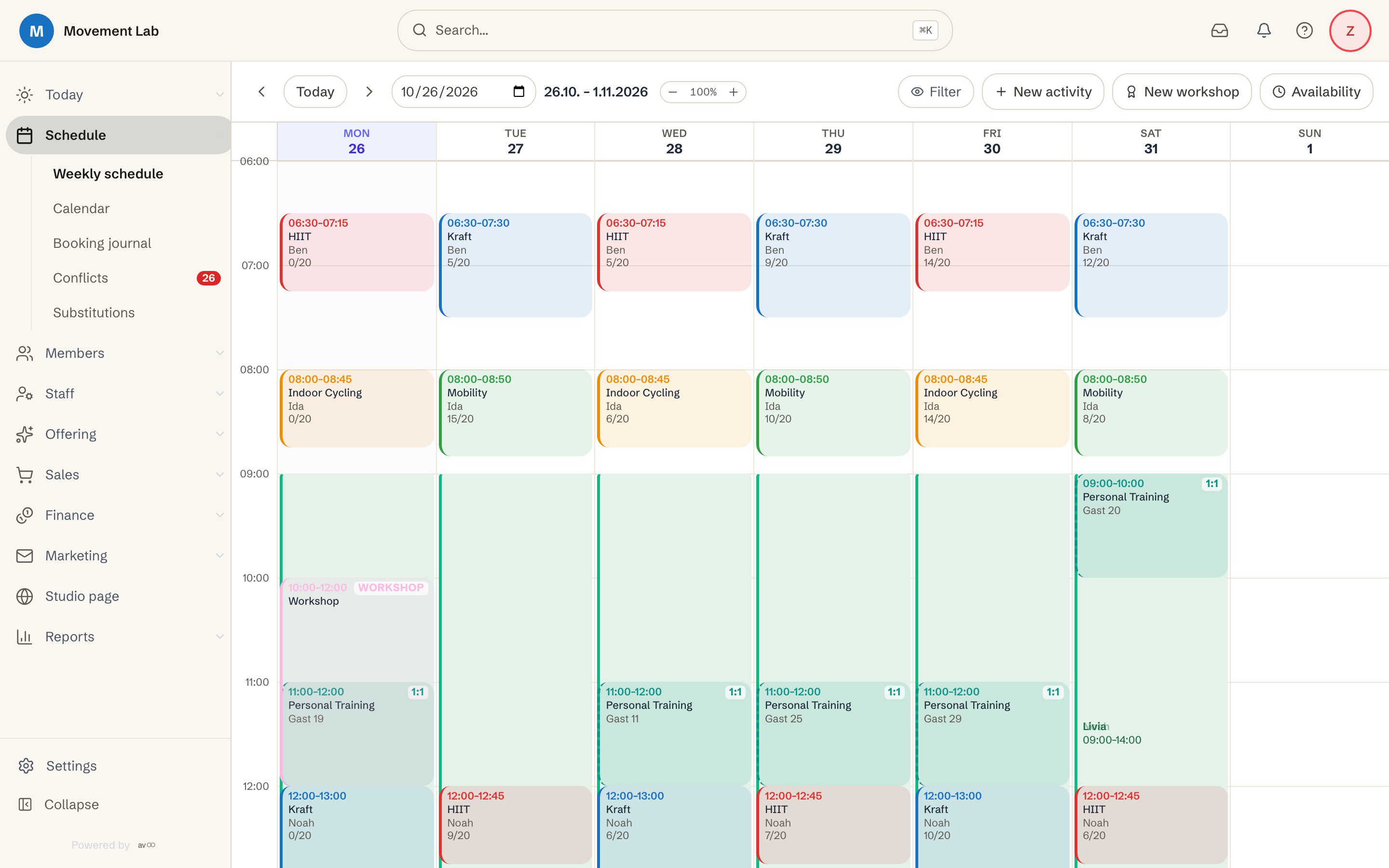
What the class schedule takes off your hands
Everything about appointments and spots lives in one system, from the first draft of the week to check-in at the door.
Planning without spreadsheets
You move and duplicate classes with drag and drop and see the week in a day or week view.
Full classes fill up again
A full class keeps a waitlist on its own. When a spot opens up, the next member moves up automatically if you want that.
Less manual work at the front desk
Members book, cancel and check in with a QR code on their own. You set the rules, avoo applies them.
All features for classes and bookings
This is what the class schedule includes, and every feature is part of the base licence.
Schedule editor (drag & drop)
Plan, move and duplicate recurring classes visually, day and week view.
Group classes, appointments & workshops
Three offering types with their own pricing, capacity and booking logic in one system.
Waitlists with auto-promotion
Full classes start a waitlist automatically; when a spot frees up the next member can be promoted automatically, if you switch it on.
Online booking & cancellation
Members book and cancel themselves, with configurable deadlines and refund rules.
Check-in via QR code & at reception
Self check-in via studio QR or manual check-in at the desk, with visual confirmation.
Categories, tags & filters
Classify and filter classes, for members, website and analytics.
No-show handling & booking limits
Automatic rules for no-shows, minimum attendance, booking windows and per-member limits.
Rooms & multiple locations
Room management and multi-location, several studios on one platform.
How a booking works
From the class in the weekly schedule to check-in, in five steps.
You create the class.
In the weekly schedule editor you create a class with time, room, instructor and number of spots, recurring or as a single appointment.
The member books.
Members book their spot on their own, online or in the app, and see right away whether anything is still free.
If the class is full, there is the waitlist.
A member joins the waitlist, and when a spot opens up, they move up automatically if you want that.
Until the deadline, the member cancels on their own.
You set the deadlines and refund rules, and your no-show rules apply when someone does not turn up.
On arrival, the member checks in.
The member scans the studio QR code, or you check them in at the front desk, each time with a visual confirmation.
Frequently asked questions about schedule and bookings
How do I plan the classes of my studio?
- You plan in the weekly schedule editor with drag and drop. You create recurring classes once, you can move and duplicate them at any time, and you see the week in a day or week view.
What happens when a class is full?
- A full class keeps a waitlist automatically. When a spot opens up, the next member moves up automatically if you want that.
Can members book and cancel on their own?
- Yes. Members book and cancel online or in the app on their own. You set the deadlines and the refund rules.
How does check-in work?
- Members check in on their own with the studio QR code, or you check them in at the front desk. In both cases you see the confirmation right away.
Can I offer single appointments and workshops besides group classes?
- Yes. Group classes, single appointments and workshops are three offer types, each with its own pricing, capacity and booking logic, all in one system.
How do I handle no-shows?
- You set rules for no-shows. On top of that come a minimum number of participants, booking windows and limits per member, which avoo applies automatically.
Does avoo support several rooms and locations?
- Yes. You manage rooms and halls and can run several locations on one platform.
Bring order to your class schedule
Set up your studio yourself and create your first class, without a sales call.